
TYPOGRAMMAR TRANSLATE / WINDOWS APP
TypoGrammar Translate: The Free Offline English Translator for Windows
In this lesson 11 sections
Version 1.0.0 · Windows 10 / 11 (64-bit) · Installer or portable ZIP · Free and open source

TypoGrammar Translate in short
TypoGrammar Translate is a free, open-source desktop translator for Windows 10 and 11 made by TypoGrammar. It translates between English and Arabic, French, Spanish, Portuguese, German, Italian, Russian, Indonesian and Japanese (18 directions) using Argos Translate neural models that run locally. After you download a language model, it works fully offline and never sends your text to any server.
- Price: free
- Platform: Windows 10 / 11, 64-bit
- Languages: English + 9 (18 directions)
- Internet: only to download models
- Account: not required
What is TypoGrammar Translate?
Online translators send everything you type to a remote server. TypoGrammar Translate does the opposite: the neural translation models live on your computer, so emails, homework, contracts and personal messages stay private.
It is made for English learners, students preparing for IELTS, TOEFL, PTE or the Duolingo English Test, teachers, travellers and professionals who need quick, private translations, even on a plane or with a weak connection.
Features
Private, offline translation
Neural translation runs on your own computer with CTranslate2. Once a language model is installed, you can translate with no internet connection.
10 languages, 18 directions
Translate from English into nine languages, and from those nine languages back into English.
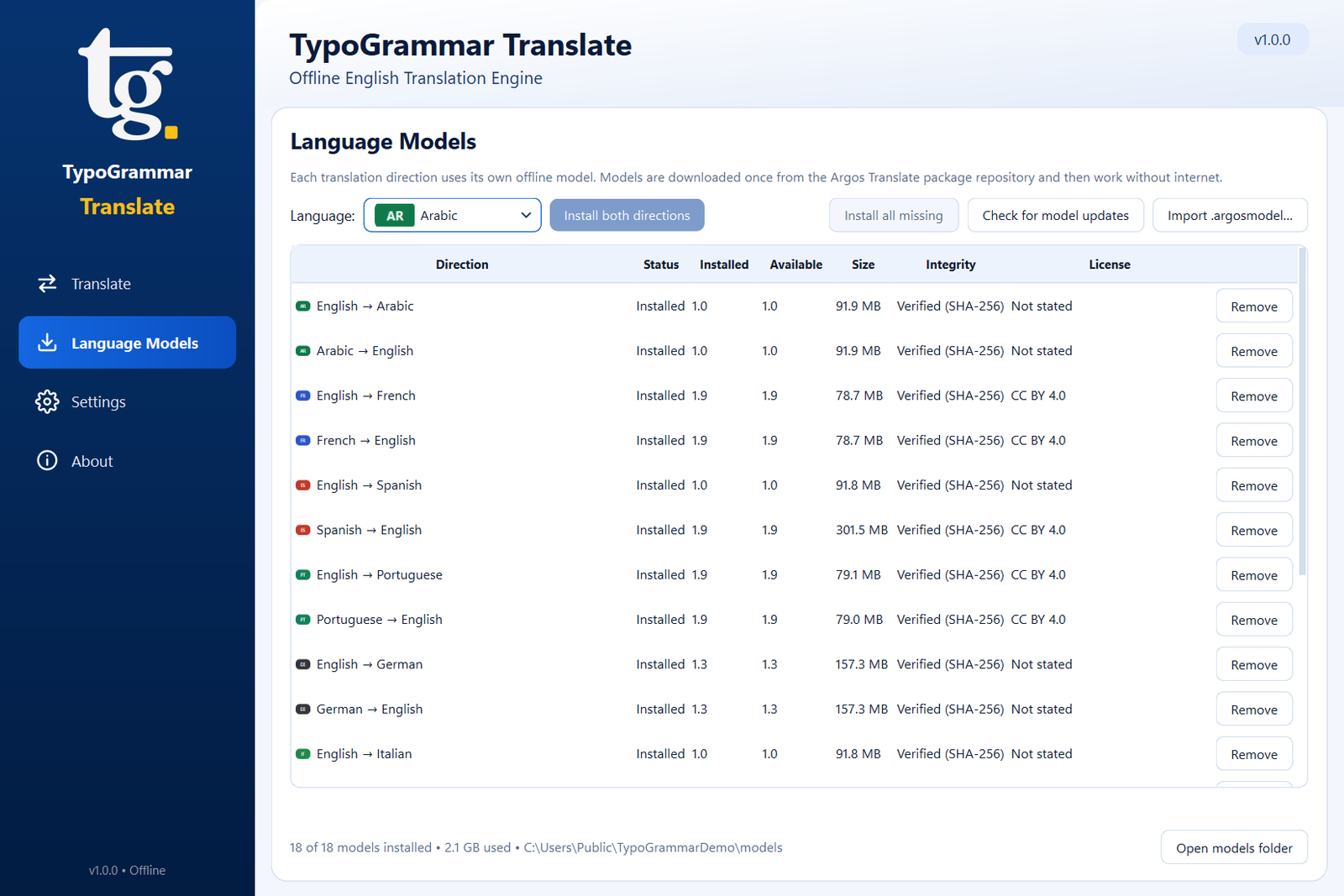
Language Models manager
Install, update, remove and import models. See versions, sizes and progress. Every download is checked against a pinned SHA-256 checksum.
Read aloud
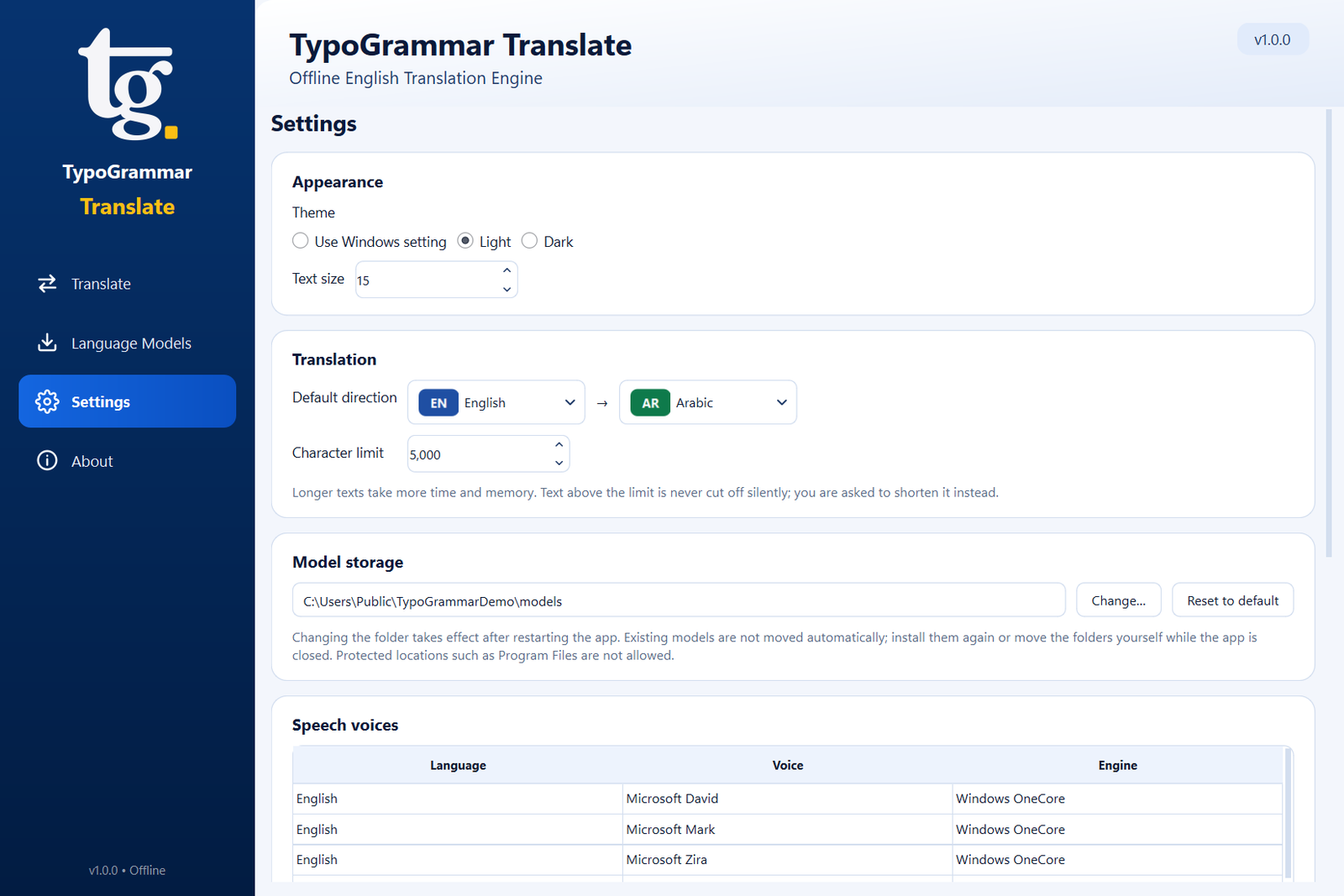
Hear the source or the translation with the voices already installed in Windows. Speech also works offline.
Built for every script
Arabic is shown right to left, and Japanese and Cyrillic text render correctly.
Comfortable to use
Light, dark and system themes, adjustable text size, high-DPI support, keyboard shortcuts, copy, clear, swap and an expanded reading view.
Supported languages
10 languages and 18 translation directions. Every language below can be translated into English and from English.
| Language | Code | To English | From English | Notes |
|---|---|---|---|---|
| Arabic | ar | ✔ | ✔ | Right-to-left layout |
| French | fr | ✔ | ✔ | |
| Spanish | es | ✔ | ✔ | |
| Portuguese | pt | ✔ | ✔ | |
| German | de | ✔ | ✔ | |
| Italian | it | ✔ | ✔ | |
| Russian | ru | ✔ | ✔ | Cyrillic script |
| Indonesian | id | ✔ | ✔ | |
| Japanese | ja | ✔ | ✔ | Japanese fonts |
Why every translation goes through English
Pairs such as Arabic → French are not offered, and the app never quietly chains two models through English. The engine uses only the direct model for the direction you choose, so the quality you get is the quality of that one model.
How to install it
Download the installer
Get
TypoGrammarTranslate-1.0.0-Setup-x64.exefrom the GitHub Releases page. Optionally, check it against the published.sha256checksum. A portable ZIP is also available.Run the installer
Choose Install for me only (no administrator rights) or Install for all users. Version 1.0.0 is not code-signed yet, so if Windows SmartScreen warns you, choose More info → Run anyway.
Install your languages
Open Language Models in the sidebar. Install one direction, both directions of a language, or Install all missing (about 2 GB). You can also import a
.argosmodelfile.
A closer look at the app


Before you get started
System requirements
64-bit Windows 10 (version 1809 or later) or Windows 11. About 200 MB for the app plus 65–300 MB per model (about 2.1 GB for all 18). 4 GB RAM recommended. No Python needed.
Read the installation guidePrivacy
Your text never leaves your PC. No telemetry, analytics, ads, accounts or API keys, and logs never contain translation text. The app goes online only to download models you choose, or for the optional update check (off by default).
Read the privacy detailsRead aloud
The speaker buttons read text aloud with the Windows speech engine (SAPI 5 and OneCore voices), fully offline. Hearing a sentence while you read it is a simple way to practise pronunciation. If a language has no voice, add one in Windows Settings → Time & language → Speech → Add voices.
Using a translator to learn English
Translation helps most when you use it to check your understanding, not replace it. Write your sentence in English first, translate it into your language to see if the meaning survived, then fix the English. To polish the English itself, try the Grammar Checker, the TypoGrammar Write extension or TypoGrammar English Coach.
Frequently asked questions
Is TypoGrammar Translate free?
Yes. TypoGrammar Translate is free and open source. There are no subscriptions, accounts, ads or API keys.
Does TypoGrammar Translate work offline?
Yes. You need the internet only to download the language models you want. After that, translation and read aloud work with no connection at all.
Is my text sent to a server?
No. All translation happens on your PC. The app has no telemetry or analytics, and its log files never contain the text you translate.
Which languages does it support?
English to and from Arabic, French, Spanish, Portuguese, German, Italian, Russian, Indonesian and Japanese: 10 languages and 18 translation directions.
Can I translate Arabic to French, or between two non-English languages?
No. Every translation goes to or from English. Other pairs are not offered and are never secretly routed through English, so you always know which model produced your translation.
What are the system requirements?
Windows 10 (version 1809 or later) or Windows 11, 64-bit. About 200 MB for the app plus 65 to 300 MB per language model (about 2.1 GB for all 18). 4 GB of RAM is recommended. Python is not required.
Does it work on Mac, Linux or phones?
Version 1.0 is built for 64-bit Windows 10 and 11 only.
Why does Windows show "Windows protected your PC"?
The 1.0.0 installer is not code-signed yet, so Microsoft Defender SmartScreen may warn you. If you downloaded it from the official GitHub Releases page, choose More info and then Run anyway. You can also check the file against the published SHA-256 checksum.
What translation engine does it use?
Open neural machine translation models from the Argos Translate project, run locally with CTranslate2.
Why is the read-aloud button disabled for a language?
Read aloud uses the speech voices installed in Windows. If no voice is installed for that language, the button is disabled. Add one in Windows Settings > Time & language > Speech > Add voices, then restart the app.
Translate privately, starting today
TypoGrammar Translate uses models from the Argos Translate project and the CTranslate2 engine. See the repository for full license details.